How to add JS Code to your Placester Website ( Codeless )
These steps are for the Legacy Customizer. For Site Edit, see Adding Tracking Codes and Custom Code.
This article will show you how t****o add a Javascript Code to integrate an App or Feature on your Placester Website (Codeless).
Feature and Application Integration
One of the existing features of the Placester website is the ability to integrate features & applications using a js/ javascript code.
Any features, widgets, or applications that use javascript code can be tested on the Placester websites, however, this does not mean that it is guaranteed to work since not all features are suitable/ fits on the Placester system.
Steps on how to add the javascript code on your Placester customizer
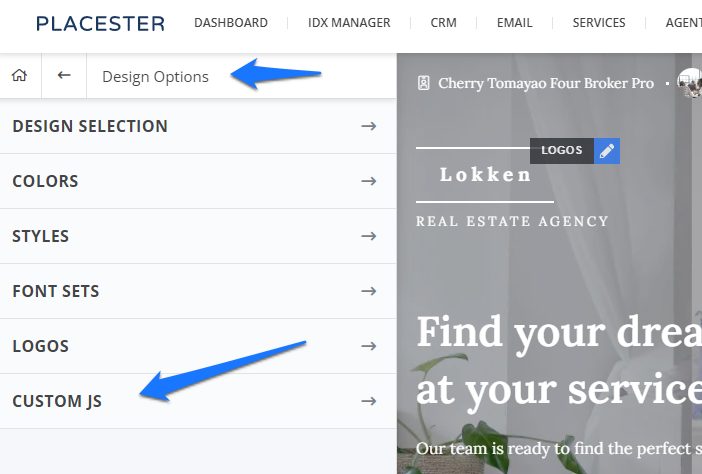
On your Placester dashboard, simply go directly to the "edit site" for you to be redirected to your Placester customizer. Once you're on your customizer, simply go to Designs Options for you to proceed to the Custom JS tab to add JS/ javascript codes.
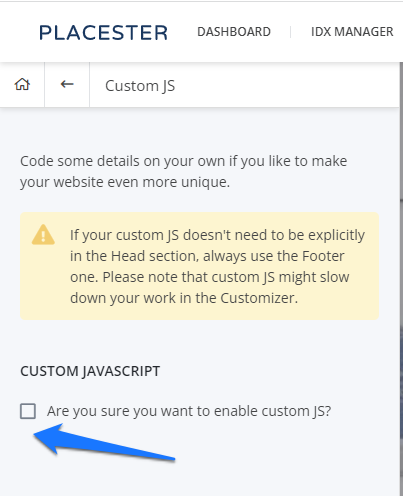
Once the custom js code has been selected, you will be redirected to a page where before you can add a javascript code, you need to mark check (✓) first the box to enable custom JS.
Once done, a box for head js and footer js will show up where you can put in your js code.
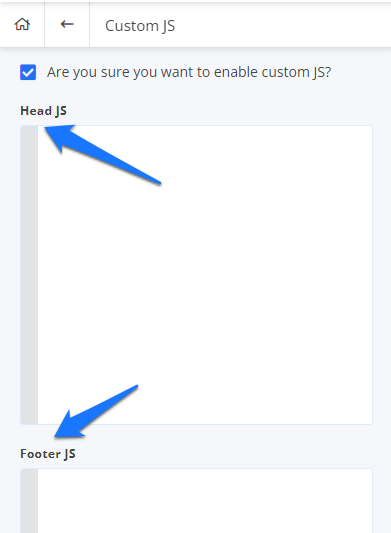
If your custom JS doesn't need to be explicitly in the head section or if you have lengthy/ heavy js code, always use the Footer JS. Also, custom js might slow down your work in the Customizer.
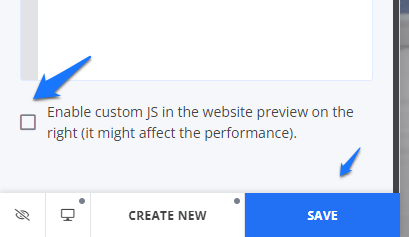
Provided that you already have your javascript code from your feature or application third party provider. You can either put in your js code to Head or Footer JS and hit save.
Also, there is a feature on the same page where you can enable providing a preview of the js code feature or application you have integrated to your Pleacester website.
If it happens that a javascript code integration did not work you can contact our Support Team so they can further assist you.
Need More Help?
For questions, concerns or feedback, please chat with our team:https://app.placester.com/chat